The design is on the whiteboard: chunks named by hash, signed URLs, a change log with a cursor. Then the interviewer says, “The metadata primary just died. What do your users see?”
Most candidates who built the happy path well freeze here. Every part of the design can fail, be attacked or run up a bill, and the last third of a senior round is spent on exactly that.
This lesson plans those answers in advance. It follows Design a File Storage Service: Chunk, Hash, Resume (2026), so start there if chunks, signed URLs and the change log are new.
- Design a File Storage Service: Chunk, Hash, Resume (2026): the design this lesson stress-tests.
- The interview framework: where failures and trade-offs fit in the 45 minutes.
When does a file become visible, and what if the commit never happens? It becomes visible at commit, after every chunk is confirmed. Without a commit the chunks are unused, and the garbage collector removes them after a grace period.
- Every part has a small planned answer, because chunks already in storage stay valid and the fix is a retry.
- Sharing lives in the metadata database; short-lived signed URLs are what make revoking work.
- Hash-named chunks spread evenly, so hot spots come from metadata (a huge user, a widely shared folder), not from bytes.
- Security has one real trade-off to name: end-to-end encryption against cross-user dedup, preview and search.
- Cost is storage and egress, so the levers are dedup, capped versions, cheaper tiers for old data and a CDN.
Take the file storage design through an outage, an attack and a budget review: say what fails, what each answer costs, and which follow-up questions to rehearse.
Who Can Open a File, and How Do the Bytes Come Back?#
Sharing is a metadata question, so it lives in the database:
- A
Sharerow gives a user a role (viewer or editor) on a file or folder; a folder share covers everything inside, so the check walks up the path. - The API server runs the check before signing any URL. Revoking deletes the row; old URLs expire within minutes.
A viewer was sent a download URL at 9:58 that expires after 5 minutes. The owner revokes the share at 10:00. Can the viewer still download at 10:01?
Yes, until 10:03. A signed URL is a bearer token: S3 lets SDKs sign one for up to 7 days, so the URL lifetime is the revocation delay. Sign for minutes and the delay stays small.
Downloads mirror uploads: GET /files/{id} checks the share and signs a short GET URL per chunk. A dropped download resumes too: HTTP range requests let the device that holds part of a file ask for only the rest. A file shared with thousands of people can sit behind a CDN, as long as its URLs stay signed.
What Happens When a Part Dies?#
Start from the table, then read the picture. All of it is design judgement, not a vendor spec.
| Part | What users see | Answer |
|---|---|---|
| API server | in-flight call fails | stateless; client retries, commit is idempotent |
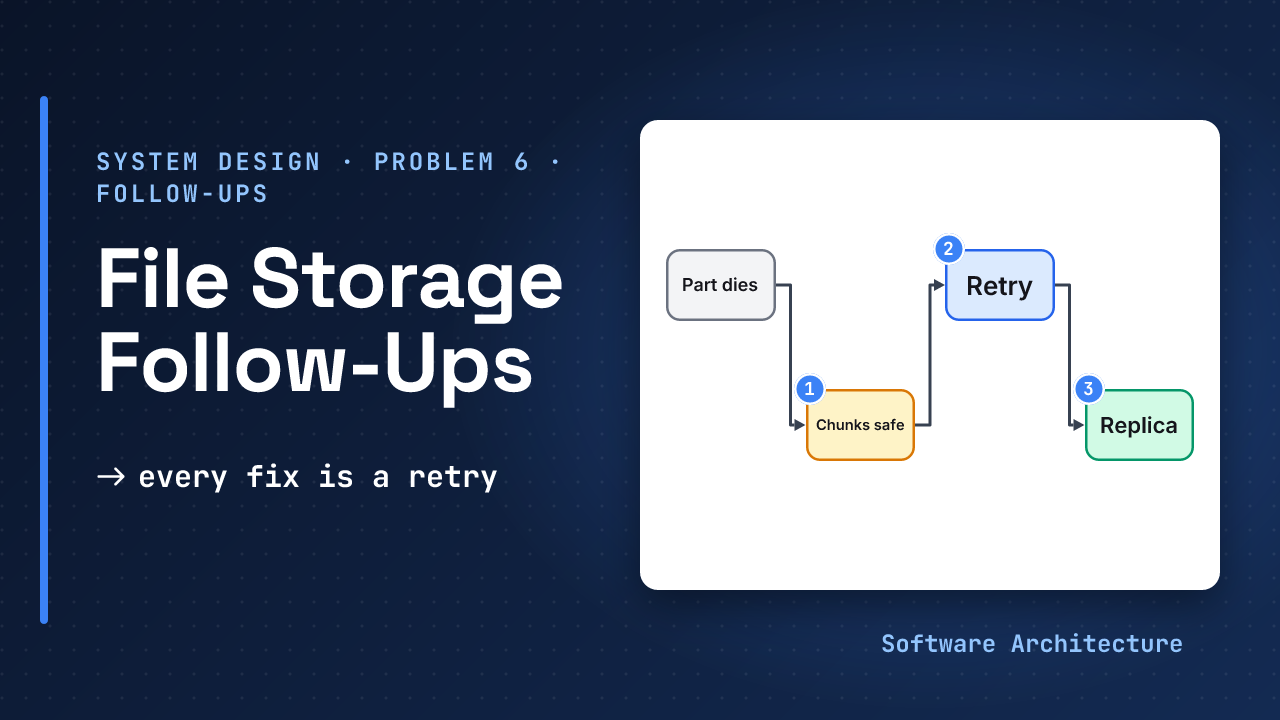
| Metadata primary | no commits or listings for its users | promote a replica (failover); bytes already in storage stay valid and the commit retries |
| Nudge service | devices lag | slow poll reads the same cursor |
| One storage zone | reads and writes there fail | data spread over several zones; retry elsewhere |
| Client mid-upload | partial file | HEAD offset, then resume; expiry cleans up |
The picture shows the pattern behind the table: chunks are immutable and named by hash, so a stored chunk is never wrong, and every repair is a retry.
Where Are the Hot Spots and Trade-offs?#
- Hashed chunk keys spread evenly.
- Metadata shards by user id.
- A user with millions of files, or a folder shared with thousands, makes a hot shard: split that tree by folder and cache share checks.
- A viral file is a hot read for the CDN.
Assumed: 10 TB / 100 shards
  = 100 GB per shard
Consistency. The commit writes the version and its log entry in one transaction on the user’s shard, so no device sees an entry without its record. In a partition, commits choose consistency: refuse rather than fork history (CAP). Otherwise we trade latency (PACELC): the owner reads the primary after saving, others may list from a lagging replica.
Durability. Dropbox’s Magic Pocket stores immutable blocks of up to 4 MB, each in at least two zones, and a disk scrubber re-checks every disk against checksums every 1 to 2 weeks (both 2016 figures).
- A 2026 Dropbox post says it now uses erasure coding for nearly all data, with a Live Coder service that writes straight into erasure-coded volumes, and compaction that reclaims space from deleted blocks.
- Judgement: 10 data plus 4 parity pieces is 1.4x the bytes against 3x for three copies, but repair reads many nodes, so replicate hot, recent data.
What If a Whole Region Goes Dark?#
Zones survive a building failing; a region outage or a bad delete needs more. S3 Standard stores objects across at least three Availability Zones, designed for 99.999999999% durability and to survive the loss of one zone. That does not cover a whole region, so copy to a second one:
- Bytes. S3 Cross-Region Replication is asynchronous, copies only new objects (older ones need Batch Replication), and Replication Time Control adds a 15-minute SLA. A Google Cloud Storage dual-region bucket is a pair of regions, with an optional turbo replication for copies within 15 minutes. A Multi-Region Access Point gives one endpoint and failover controls that shift traffic within minutes.
- Metadata. Judgement: ship each shard’s change log to a standby region and promote it in a disaster.
- Recovery point. Copies are asynchronous, so the delay is the data you can lose. Metadata and chunks copy on separate clocks, so a file record may point at a chunk that has not arrived. The device still holding the file re-uploads it, and dedup makes that cheap.
- Bad deletes. A replica copies mistakes too. Keep a versioned copy under Object Lock, which needs versioning and blocks deletes until a retention date, to restore after ransomware.
The picture shows the one number to state: the copy delay is how much recent work a regional disaster can cost.
Who Attacks, and What Stays Private?#
- TLS in transit. At rest, S3 encrypts every new object by default (SSE-S3, since 5 January 2023); per-user keys are a further layer.
- End-to-end encryption is the trade-off to name: if only the client holds keys, the server cannot deduplicate across users, preview or search.
- Cross-user dedup is a privacy leak in its own right: a device that sees its upload skipped learns that someone else stores the file. The side channel was described in 2010, so dedup per user, or across users only on the server after the bytes arrive.
- Abuse: rate-limit URL signing, cap sizes, enforce quota, scan new files asynchronously.
- Deletion must really delete: expire versions, then collect, except under legal hold.
What Do You Watch, and What Does It Cost?#
Observability. Track upload success rate, commit p99 latency, sync lag (commit to the other device’s cursor), collector backlog and orphan bytes. Page on any scrub checksum mismatch, and on error-budget burn that would break the SLO.
Cost. Storage and egress dominate. The levers:
- dedup, so repeated bytes are stored once;
- capped versions;
- cheaper storage classes for old versions;
- a CDN for hot shares.
Rollout and backfill. Record the chunker version in each file. New uploads use the new chunker; old files keep theirs.
How Long Do Versions and Offline Changes Live?#
History needs an end date, a product rule: Dropbox keeps version history for 30, 180 or 365 days depending on plan. A cleanup job deletes expired versions; the garbage collector frees their unshared chunks.
The sync client has its own state to bound. Its local database holds:
- the cursor, and the last synced chunk list of every file;
- a cache of chunks by hash, so a moved or restored file needs no download;
- a queue of local changes made offline, each tagged with the version it started from.
On reconnect it reads the log, then sends the queue; a commit on a stale base version is a conflict for the policy chosen in the main lesson. Cap the chunk cache by size, and drop its oldest chunks first, since any chunk can be fetched again by its hash.
Follow-ups to Rehearse#
| Question | Short answer |
|---|---|
| 10x traffic? | more metadata shards and replicas; storage scales by adding zones |
| Metadata DB down? | read-only from replicas and caches; commits wait |
| 5 TB file? | part size rises with the 10,000-part cap |
| Folder with 1M files? | paginated listing by cursor, never one response |
| Clock skew? | order by server sequence numbers, not timestamps |
| Lose a region? | promote the standby; state the copy delay as the recovery point |
What Do Levels Look Like?#
| Level | Expected in the failure slot |
|---|---|
| Mid | names the failure and the retry; knows chunks are immutable |
| Senior | adds revocation delay, hot shards, the E2E against dedup trade-off, costs |
| Staff | adds recovery point for a region loss, ransomware restore, rollout and SLOs |
The 45-Minute Plan, With the Failure Slot#
Requirements and assumptions 5, estimates and API 5, simple design 5, deep dives 20 (upload 7, dedup 5, sync 5, cleanup 3), failures, security and cost 5, wrap-up 5.
The five-minute failure slot goes fast. Spend two on the table above, two on one hot spot and one trade-off (encryption against dedup), and one on cost. Offer the rest as “I can go deeper on any of these.”
“We’ll add replicas and a CDN, so it won’t go down.” No named failure, no statement of what users see, and nothing about what happens to a half-finished upload.
“If the metadata primary dies, commits pause for that shard until a replica takes over. Stored chunks stay valid, so clients retry the idempotent commit. Reads continue from replicas, and I’d watch commit p99 and sync lag.”
Try It: Cost and a Crash#
Use the assumed 50 PB of unique chunk data.
- How many bytes does storage hold with three full copies, and with 10 data plus 4 parity pieces?
- Every chunk of an upload is confirmed. The metadata primary then dies before the commit lands. What does the user see, what sits in storage, and what repairs it?
Hint
Multiply 50 PB by 3 and by 14/10. For part 2, ask when the file becomes visible.
One reasonable answer
3 copies: 50 x 3 = 150 PB
10+4:     50 x 1.4 = 70 PB
saving:   80 PB
Keep three copies (or two zones) for recent data, and erasure code older data, because repair reads many nodes.
For part 2: the file is not visible, since commit never ran. The user sees a pending upload or a retry. All chunks are in storage and valid. After the replica takes over, the client retries the commit, which is idempotent on the upload id, so one file appears. If the client never returns, the garbage collector removes the chunks after the grace period and expiry.
Check Yourself#
1.The metadata primary fails. Why are already-uploaded bytes still safe?
Chunks are named by the hash of their content and never modified, so a stored chunk cannot be half-written or stale. Only the file record is unavailable until failover, and the retried commit is idempotent.
2.A folder shared with 5,000 people becomes slow. What do you change?
Treat it as a hot shard: split that folder tree across shards, cache the share check, and put hot downloads behind a CDN with signed URLs.
3.Your product adds end-to-end encryption. What do you give up?
Cross-user dedup, previews and search, because the server only sees bytes it cannot read, and identical files no longer match.
4.Which two signals show the sync feature is healthy?
Sync lag (commit time to the other device’s cursor) and upload success rate, with commit p99 latency alongside. Any scrub checksum mismatch should page someone.
Cover the table above and name each part’s failure and its answer aloud in 60 seconds. Then repeat it for a different part than the one you started with.
In One Picture#
Add this to the 60-second answer from the main lesson: “Metadata shards by user; chunks are erasure coded across zones. If a part dies, stored chunks stay valid and the fix is a retry. I would watch sync lag and commit p99.”
chunks immutable: repair = retry
short URLs: revoke in minutes
E2E vs dedup: name the trade-off
cost: storage + egressConclusion#
A design is finished when you know how it fails. Immutable, hash-named chunks turn most failures into retries, and the rest are decisions about shards, keys and money.
Which follow-up would you rehearse first: the dead primary, the revoked share or the cost question? Tell us in the comments.
- Back to the core design: Design a File Storage Service: Chunk, Hash, Resume (2026).
- Where the bytes live: the object storage lesson and database sharding and replication.
- After this lesson: the web crawler problem, which has to fetch billions of pages politely and never twice.